Cyber week deals! Galaxy Watch8 Classic, Fold 7, S25 Ultra. Follow us on YouTube, TikTok, or Instagram
Last updated: May 29th, 2024 at 17:42 UTC+02:00
SamMobile has affiliate and sponsored partnerships, we may earn a commission.
Reading time: 1 minutes
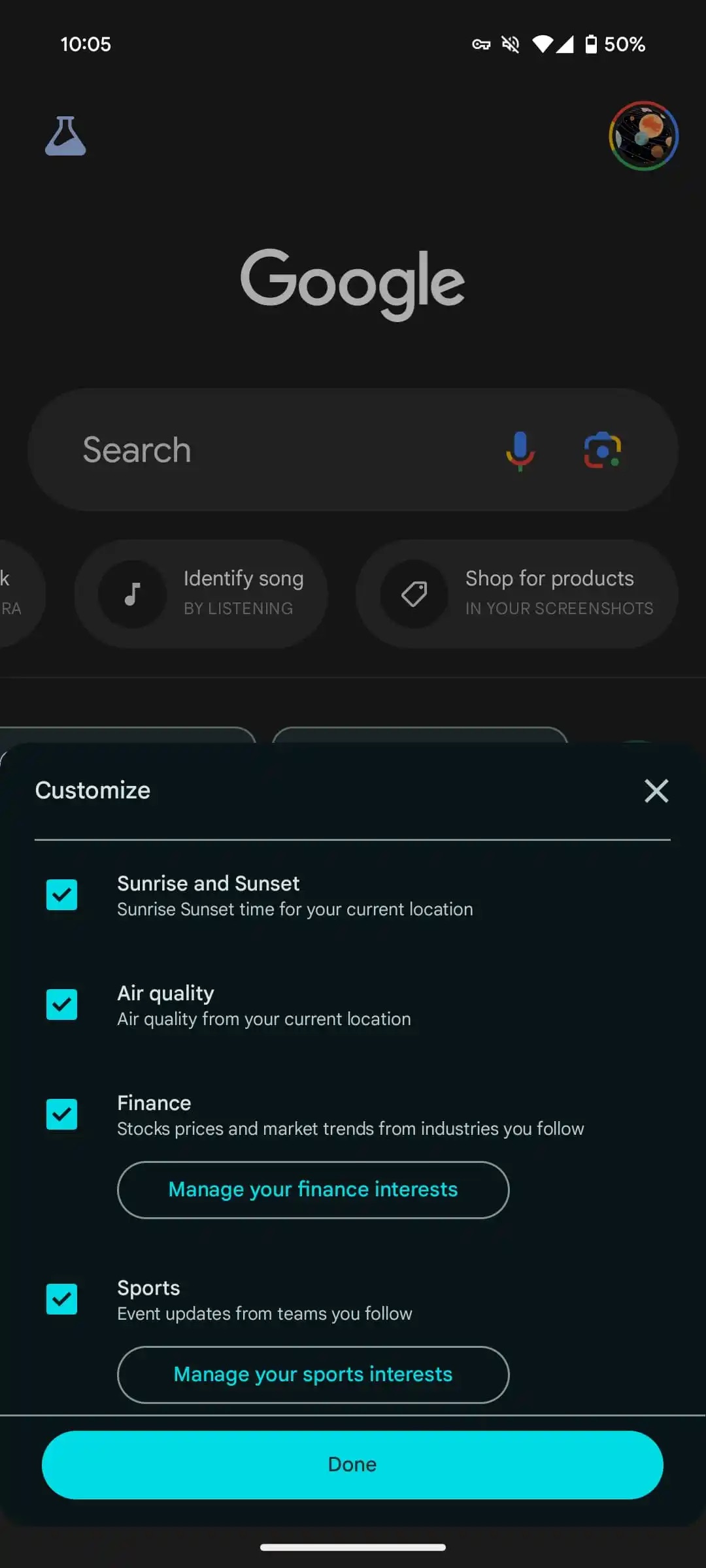
The Google app for Android’s Discover section gives you the option to see four cards: Air quality, Finance, Sport, and Weather. Well, Google has now added one more card to the Discover section of the Google app: Sunrise and Sunset (via 9To5Google).
As the name suggests, the Sunrise and Sunset card shows you the “Sunrise Sunset time for your current location.” To see this card, swipe left on the card carousel, click on Settings (Customize your space), and enable the Sunrise and Sunset option.
At the moment, there’s no information if Google is adding the ‘Sunrise and Sunset’ card to the Discover section of the Google app through an update to the app or from a server-side change. We haven’t received it yet on our Galaxy S23 in India.
The story continues after the video…
To make sure that you get the ‘Sunrise and Sunset’ card as soon as Google rolls it out in your region or for your device, update the Google app to the latest version. Restarting the app or the device sometimes triggers the app to show the new feature.
I’m a computer science engineer living in Hyderabad, India, who has a keen interest in automobiles and consumer electronics. My journalism career kicked off in 2017 with MySmartPrice where I wrote news, features, buying guides, and explanatory articles about technology among other things, and reviewed many products, including smartphones, tablets, laptops, PC components, smartwatches, audio devices, wearables, and smart home products. Since then, I have worked for 91Mobiles, Apple, and Onsitego, before finally landing on SamMobile.